


These Megaupload tricks are particularly useful for those who receive the message "All slots assigned to your country are in use", when you try to download a file.
I'm still not completely sure if this will work all the time, but its worth a try even if it works 60% of the time. Below are four different methods you can try.
If you would like to make any other suggestions, feel free to leave a comment..
For RapidShare:
If you have a ADSL connection with dynamic IP address, just restart you ADSL router/modem and clean your browser cache, especially cookies. This should be enough.
Method 4 listed below may also work for Rapidshare.
Method 1:
Go to http://upandup.freehostia.com/accelerator.html to easily bypass Megaupload download slots. Just as a precaution, clean your browser cache before each attempt, even though I don't think this is necessary.
Method 2:
If you can't get those country slots, you can read the post about a new version of a Firefox extension called Megaupload S.X3.2 for megaupload.
Method 3:

1. Go to the Google Translate tool. Here you'll find two sections : Translate Text and Translate a Web Page.
2. In the Translate a Web Page text box, paste your megaupload download link. Select the translation of your choice and hit the Translate button to load the megaupload file download page.
If you have anything to say about this method or you have some other trick, please let me know.
Method 4:
This method involves browsers that use the anonymous TOR network. XeroBank (formerly know as Torpark) is one if the browsers and OperaTor (check the post on OperaTor) is the other. XeroBank is a modified version of Firefox with TOR and OperaTor is a combination of the Opera browser, TOR and Privoxy.
Setting these browsers can be quite a headache. So be prepared to do some extra reading to get them started. Also, my guess is since these browsers use the TOR network, breaking limits may be possible in almost any services like Megaupload, Rapidshare..etc
Method 5:
 For Firefox users:
1. Install the Firefox addon named User Agent Switcher.
2. Once installed, go to Tools >> User Agent Switcher >> Options >> Options.
The User Agents Switcher Options window is displayed.
3. Select User Agents from the list in the leftmost part of your screen.

4. Click Add to add a new user agent and type these details in the resulting window:
a. In the Description box type : MEGAUPLOAD
b. In the User Agent box type : Mozilla/4.0 (compatible; MSIE 6.0; Windows NT 5.1; SV1; Alexa Toolbar)
5. Click OK twice to close the two windows and finish adding the new user agent.
So how do you use it from here? Just before you download a file from Megaupload, go to
Tools >> User Agent Switcher >> MEGAUPLOAD.
You can always set the user agent back to default after your download is complete.
.................................................................
Update for Firefox 2
Someone has commented the same thing can be done without using the Firefox User Agent add-on :
Type in the address bar this: about:config
Then search for this key: general.useragent.extra.firefox
Double click on it and add this: MEGAUPLOAD 1.0
So at the end it will look like this: Firefox/2.0 MEGAUPLOAD 1.0
Restart Firefox and now you have infinite slots.
.................................................................
Method 6:
 For Internet Explorer users:
IE users will have to edit settings in the Windows Registry.
(Caution: Please ensure you backup your registry before proceeding. Read this post if you don't know how to backup the registry.)
1. Go to Start >> Run.
Type regedit and press Enter. This will open the Registry editor.
2. IE 7 (IE 6 users can also try this ) users must navigate to the following :
HKEY_LOCAL_MACHINE\SOFTWARE\Microsoft\Windows\CurrentVersion\Internet
Settings\User Agent\Post Platform.
3. Other IE users must go to:
HKEY_LOCAL_MACHINE\SOFTWARE\Microsoft\Windows\CurrentVersion\Internet
Settings\5.0\User Agent\Post Platform.
4. Now right-click the Post Platform folder and go to New >> String Value.
Type Alexa Toolbar as the name and click Ok.
Enjoy downloading...
Tags:
megaupload megaupload tips megaupload tricks megaupload tweaks trick megaupload megaupload download slots megaupload download megaupload download slot cheat megaupload

I'm still not completely sure if this will work all the time, but its worth a try even if it works 60% of the time. Below are four different methods you can try.
If you would like to make any other suggestions, feel free to leave a comment..
For RapidShare:
If you have a ADSL connection with dynamic IP address, just restart you ADSL router/modem and clean your browser cache, especially cookies. This should be enough.
Method 4 listed below may also work for Rapidshare.
Method 1:
Go to http://upandup.freehostia.com/accelerator.html to easily bypass Megaupload download slots. Just as a precaution, clean your browser cache before each attempt, even though I don't think this is necessary.
Method 2:
If you can't get those country slots, you can read the post about a new version of a Firefox extension called Megaupload S.X3.2 for megaupload.
Method 3:

1. Go to the Google Translate tool. Here you'll find two sections : Translate Text and Translate a Web Page.
2. In the Translate a Web Page text box, paste your megaupload download link. Select the translation of your choice and hit the Translate button to load the megaupload file download page.
If you have anything to say about this method or you have some other trick, please let me know.
Method 4:
This method involves browsers that use the anonymous TOR network. XeroBank (formerly know as Torpark) is one if the browsers and OperaTor (check the post on OperaTor) is the other. XeroBank is a modified version of Firefox with TOR and OperaTor is a combination of the Opera browser, TOR and Privoxy.
Setting these browsers can be quite a headache. So be prepared to do some extra reading to get them started. Also, my guess is since these browsers use the TOR network, breaking limits may be possible in almost any services like Megaupload, Rapidshare..etc
Method 5:
 For Firefox users:
1. Install the Firefox addon named User Agent Switcher.
2. Once installed, go to Tools >> User Agent Switcher >> Options >> Options.
The User Agents Switcher Options window is displayed.
3. Select User Agents from the list in the leftmost part of your screen.
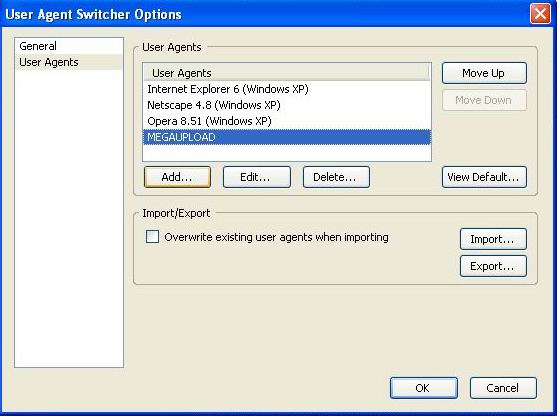
4. Click Add to add a new user agent and type these details in the resulting window:
a. In the Description box type : MEGAUPLOAD
b. In the User Agent box type : Mozilla/4.0 (compatible; MSIE 6.0; Windows NT 5.1; SV1; Alexa Toolbar)
5. Click OK twice to close the two windows and finish adding the new user agent.
So how do you use it from here? Just before you download a file from Megaupload, go to
Tools >> User Agent Switcher >> MEGAUPLOAD.
You can always set the user agent back to default after your download is complete.
.................................................................
Update for Firefox 2
Someone has commented the same thing can be done without using the Firefox User Agent add-on :
Type in the address bar this: about:config
Then search for this key: general.useragent.extra.firefox
Double click on it and add this: MEGAUPLOAD 1.0
So at the end it will look like this: Firefox/2.0 MEGAUPLOAD 1.0
Restart Firefox and now you have infinite slots.
.................................................................
Method 6:
 For Internet Explorer users:
IE users will have to edit settings in the Windows Registry.
(Caution: Please ensure you backup your registry before proceeding. Read this post if you don't know how to backup the registry.)
1. Go to Start >> Run.
Type regedit and press Enter. This will open the Registry editor.
2. IE 7 (IE 6 users can also try this ) users must navigate to the following :
HKEY_LOCAL_MACHINE\SOFTWARE\Microsoft\Windows\CurrentVersion\Internet
Settings\User Agent\Post Platform.
3. Other IE users must go to:
HKEY_LOCAL_MACHINE\SOFTWARE\Microsoft\Windows\CurrentVersion\Internet
Settings\5.0\User Agent\Post Platform.
4. Now right-click the Post Platform folder and go to New >> String Value.
Type Alexa Toolbar as the name and click Ok.
Enjoy downloading...
Tags:
megaupload megaupload tips megaupload tricks megaupload tweaks trick megaupload megaupload download slots megaupload download megaupload download slot cheat megaupload


No comments:
Post a Comment